Technical SEO is the work that makes your website easy for search engines to crawl, render, understand and index. If content is what people read, technical SEO is what Googlebot has to deal with first. When the technical foundations are weak, rankings become harder to earn and easier to lose.
A page has to be discoverable (crawled), eligible (not blocked or noindexed), and understood (rendered and interpreted correctly) before it can perform.
This handbook goes deeper than a typical “checklist”. Every term and technique is explained, with UK-relevant implementation advice and real examples.
What technical SEO actually covers
Technical SEO includes any optimisation that changes how search engines access and process your site. The main areas are:
- Crawlability: whether bots can reach your URLs
- Indexability: whether URLs are allowed into the index
- Rendering: whether Google can load and interpret the page content, including JavaScript
- Site architecture: how pages connect and how authority flows internally
- Performance and UX signals: speed, stability and responsiveness, including Core Web Vitals
- Duplicate and parameter control: canonicals, URL parameters, pagination and faceted navigation
- Structured data: schema markup that helps search engines interpret entities and page types
- International targeting: hreflang, regional versions and content mapping
- Security and protocols: HTTPS, mixed content, security headers, safe browsing issues
- Migrations and change management: redirects, replatforms, domain moves, audits
A useful mental model is that technical SEO reduces friction. It removes barriers between your content and the search engine systems evaluating it.
How search engines work (in practical terms)
Before you fix technical issues, you need to know what you are fixing for.
Crawling
Crawling is when a search engine bot requests a URL and downloads the resources it is allowed to access. The bot is typically “Googlebot” for Google.
Crawling is influenced by:
- Link discovery (internal links, external links)
- Sitemaps
- Crawl controls, such as robots.txt
- Server capacity and response times
- Crawl demand (how important and fresh Google believes your pages are)
Rendering
Rendering is when Google processes HTML, runs JavaScript (if needed), and builds a view of the page similar to what a user’s browser would see. Google can render JavaScript, but it may happen later than the initial crawl, which is why JavaScript-heavy sites can see delays in indexing or missing content if key elements only appear after scripts run.
Indexing
Indexing is when Google stores information about a URL in its index so it can be retrieved for ranking. If a URL is crawled but not indexed, there is always a reason. Common reasons include “noindex”, duplication, poor quality signals, soft 404s, or blocked resources that stop proper rendering.
Ranking
Ranking is how Google orders indexed results for a query. Technical SEO does not guarantee rankings. What it does is ensure your best pages are eligible, accessible, and interpretable, so your content and authority signals can actually compete.
Crawlability: making sure bots can access your content
If Googlebot cannot reach your important pages, those pages are invisible in organic search. The video below explains this in simple terms.
robots.txt (what it is, what it is not)
A robots.txt file is a plain-text file that sits at the root of your domain and provides instructions to crawlers about which paths they are allowed to crawl.
Key terms you will see in robots.txt:
- User-agent: the crawler you are giving instructions to (for example, Googlebot).
- Disallow: a path you are asking the crawler not to request.
- Allow: an exception that permits crawling within a disallowed path (useful when you block a folder but want a specific file crawled).
- Sitemap: a line that points crawlers to your XML sitemap location.
Important meaning:
- robots.txt controls crawling, not indexing. Google explicitly says robots.txt is not a mechanism for keeping a page out of Google. If you need a page removed from results, you use “noindex” or other methods.

Real example using StudioHawk UK
Your key commercial pages (for example, https://studiohawk.co.uk/seo-services/technical-seo/ and https://studiohawk.co.uk/contact/) are pages you would typically want fully crawlable. A common technical mistake is accidentally disallowing a directory that contains service pages after a development change. That turns SEO off at the switch without anyone noticing until traffic drops.
XML sitemaps (what they do and how to use them)
An XML sitemap is a machine-readable list of URLs you want search engines to discover and prioritise. It does not force indexing. It improves discovery and helps Google understand your preferred canonical URLs, especially on larger sites.
Key terms:
- URL entry: a single page listed in the sitemap.
- lastmod: optional metadata indicating the last modified date. Useful when accurate, harmful when auto-updated for every deploy.
- Sitemap index: a file that lists multiple sitemaps, used for large sites.
Best practice:
- Include only canonical, indexable URLs
- Exclude redirected URLs, noindexed pages, and error URLs
- Keep it updated as you publish new pages
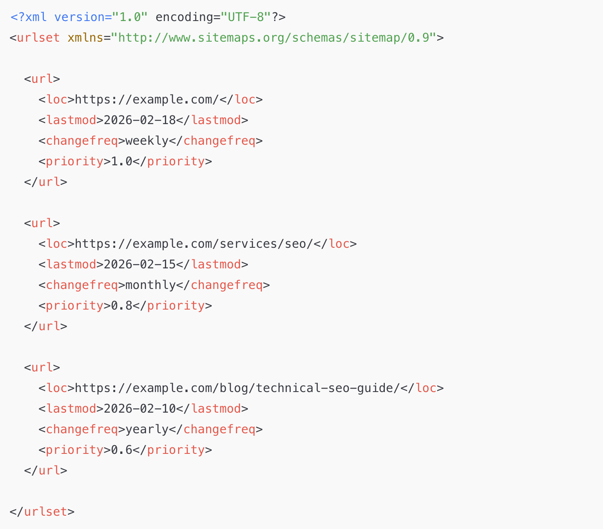
Example of what search engines like Google expect from your XML sitemap*
What each tag means
<?xml version="1.0" encoding="UTF-8"?> declares the XML format and encoding. It sits at the top of the file and tells search engines how to read the sitemap correctly.
<urlset> is the main container that holds all URLs inside the sitemap. It also includes the sitemap protocol namespace so crawlers understand the structure.
<url> represents one individual page entry. Every URL you want indexed should sit inside its own <url> block.
<loc> contains the full canonical URL of the page. It must be an absolute URL (including https://) and should match the version you want search engines to index.
<lastmod> shows the date the page was last updated. This helps search engines decide when a page might need to be crawled again, especially on large or frequently updated sites.
<changefreq> gives a general hint about how often a page changes, such as daily, weekly or monthly. It is only a suggestion and does not directly affect rankings.
<priority> indicates the relative importance of a page compared to other URLs on the same website, using a value from 0.0 to 1.0. It helps with crawl prioritisation within the sitemap but does not influence SEO rankings.
Real example using StudioHawk UK
StudioHawk UK has a mixture of service pages (for example, https://studiohawk.co.uk/seo-services/ecommerce-seo/ and https://studiohawk.co.uk/seo-services/on-page-seo/) and blog content (for example, https://studiohawk.co.uk/blog/introduction-to-learning-technical-seo/). In a best-practice setup, both content types appear in sitemaps, but you may split them into separate sitemaps (services sitemap, blog sitemap) for cleaner diagnostics and easier monitoring in Google Search Console.
Crawl budget (what it means and when it matters)
Crawl budget is the combination of:
- Crawl capacity limit: how much Google can crawl without overloading your server
- Crawl demand: how much Google wants to crawl based on perceived importance and freshness
For most small to mid-sized UK sites, crawl budget is not the first problem. It becomes relevant when:
- You have tens of thousands of URLs
- Your site generates many parameterised URLs
- You have faceted navigation that creates near-infinite crawl paths
- Your server is slow and returns errors
If you are seeing Googlebot spending time on low-value URLs while important pages update slowly, then crawl budget becomes very real.
Indexability: controlling what Google is allowed to index
Indexability is where many “invisible” problems live. A page can be crawlable but not indexable.
Meta robots and X-Robots-Tag (how noindex works)
A robots meta tag is a tag in a page’s HTML header that tells crawlers how to treat that page. The most important directive is noindex, which tells Google not to store the page in the index.
Key terms:
- noindex: do not index this page
- nofollow: do not follow links on this page (used far less than people think, and often not recommended)
- X-Robots-Tag: the HTTP header version of the same directives, often used for non-HTML files like PDFs
Practical meaning:
- noindex is stronger than robots.txt for keeping a page out of results, because robots.txt might stop Google from crawling the page and therefore stop it from seeing the noindex directive.
- If you want something deindexed, it has to be accessible enough for Google to see the noindex, or removed with other methods.
Real example using StudioHawk UK
Your contact page (e.g. https://studiohawk.co.uk/contact/) is typically an indexable page for branded and commercial intent searches. If it were accidentally set to noindex after a template update, you would likely see:
- The URL drops out of the index
- Branded queries showing sitelinks changes
- A decline in “contact” and navigational traffic
This is why indexability checks should be part of release QA.
Canonical tags (what “canonical” means and how to use it)
A canonical tag is a link element in the HTML head that tells search engines which URL is the preferred version when multiple URLs have similar or identical content
For example:<link rel="canonical" href="https://example.com/services/seo/" />
Example in context (inside the <head> section):
<head>
<title>SEO Services | Example</title>
<link rel="canonical" href="https://example.com/services/seo/" />
</head>
Key terms:
- Canonical URL: the preferred URL you want indexed
- Duplicate content: content that appears on multiple URLs (often from parameters, pagination, or sorting)
- Self-referencing canonical: a page canonicals to itself, confirming it is the preferred version
Canonical tags are hints, not absolute commands. Google may choose a different canonical if signals strongly suggest another URL is better.
Canonicals are essential for:
- E-commerce filters and sort parameters
- Tracking parameters
- Print versions
- Pagination variants
- Near-duplicate landing pages
Why it matters
Without canonicals, Google can index multiple versions of the same page, splitting relevance and internal authority across duplicates. This weakens ranking potential and bloats the index.
Site architecture: the technical backbone that affects rankings
Architecture is often treated as “content planning”, but it has direct crawl and index consequences.
URL structure (what makes a “good” URL)
A URL is not just a string. It is a signal of hierarchy, intent and page purpose.
Key terms:
- Slug: the readable part of the URL (for example, “technical-seo” in /seo-services/technical-seo/)
- Folder structure: the path segments that imply hierarchy (for example,/seo-services/ as a parent)
A high-quality URL structure tends to be:
- Short and descriptive
- Consistent in naming patterns
- Lowercase
- Avoiding unnecessary parameters
- Aligned with how users search
Real example using StudioHawk UK
Your service URLs follow a clean folder structure. For example, https://studiohawk.co.uk/seo-services/technical-seo/ clearly communicates page type and topic. This is the type of structure that makes it easier to maintain internal linking, navigate analytics, and scale content without creating a mess of ungrouped pages.
Internal linking (how Google discovers and values pages)
Internal linking is how pages on your own site link to one another.
Key terms:
- Orphan page: a page with no internal links pointing to it (Google may still find it via sitemap, but it will usually underperform)
- Click depth: how many clicks from the homepage it takes to reach a page
- Anchor text: the clickable text of a link, which helps describe the destination
Practical meaning:
- Internal links are discovery signals and contextual signals.
- The more prominent and relevant internal links a page has, the more likely it is to be crawled frequently and understood correctly.
Real example using StudioHawk UK
A strong pattern is linking between relevant services and supporting blog content. If a visitor is on https://studiohawk.co.uk/seo-services/technical-seo/, internal links to relevant guidance articles (and vice versa) help users and search engines understand topical depth. The technical benefit is that it reduces orphaning and improves crawl efficiency.
Breadcrumbs (what they are and why they help)
Breadcrumbs are navigation links that show the user’s position in the site hierarchy (Home > Services > Technical SEO).
Benefits:
- Improves usability
- Supports internal linking
- Can be enhanced with breadcrumb structured data
Performance, Core Web Vitals, and what Google actually measures
Speed is not one metric. It is a set of user experience measurements.
Core Web Vitals (meaning of each metric)
Core Web Vitals are a set of metrics Google uses to measure real-world page experience for loading performance, interactivity, and visual stability of the page.
The three Core Web Vitals metrics are:
- Largest Contentful Paint (LCP)
Meaning: how quickly the main content (often the hero image or main heading block) loads.
Practical goal: users should feel the page has loaded quickly. - Interaction to Next Paint (INP)
Meaning: how responsive the page is when a user interacts (clicks a button, opens a menu, submits a form). INP replaced FID as the responsiveness metric. Google’s announcement is at
Practical goal: interactions should feel instant, not laggy. - Cumulative Layout Shift (CLS)
Meaning: how visually stable the page is while loading. If elements jump around, you get a high CLS.
Practical goal: stop layout shifts caused by late-loading fonts, images without dimensions, or injected banners.
Lab data vs field data (what those terms mean)
When you measure performance, you will see two data types:
- Lab data: synthetic tests run in controlled conditions (useful for debugging).
- Field data: real user measurements from the Chrome User Experience Report (more representative, used in Search Console’s Core Web Vitals report).
Practical meaning:
- Lab tools show you what might be wrong.
- Field data tells you whether real people are experiencing the issue at scale.
Common performance techniques (and what each one means)
If you need to fix Core Web Vitals, the fixes usually come from a handful of techniques. Here is what each term means:
- Caching: storing a version of a resource so it loads faster next time (browser cache, server cache, CDN cache).
- Compression: reducing file sizes (Gzip or Brotli) so HTML, CSS and JS download faster.
- Minification: removing unnecessary characters from code to shrink file sizes.
- Image optimisation: compressing images, using modern formats (like WebP), and serving appropriately sized images.
- Lazy loading: delaying loading of off-screen images until the user scrolls near them.
- Critical CSS: loading the CSS needed for above-the-fold content first, deferring the rest.
- Reducing JavaScript execution: cutting unused scripts, deferring non-essential scripts, and avoiding heavy client-side rendering where possible.
These are not “nice-to-haves”. They are directly tied to user experience and, for competitive queries, can be the difference between page one and page two.
Mobile-first indexing and mobile UX
Mobile-first indexing means Google primarily uses the mobile version of the content for indexing and ranking.
Practical meaning:
- If content is hidden, truncated, or omitted on mobile, it is the mobile version that matters for ranking.
- Navigation and internal links must be accessible on mobile, not hidden behind broken menus or tap targets that fail.
When you audit mobile, look at:
- Content parity (same headings, copy, internal links)
- Tap target spacing
- Intrusive interstitials (banners that block content)
- Mobile performance and layout stability
Always check that the mobile version of your website is optimised and functions as it should (see example below)

Technical content duplication: parameters, pagination, and faceted navigation
Duplication is often created by systems, not people.
URL parameters (what they are and why they cause problems)
A URL parameter is anything after a “?” in a URL (for example,?sort=price or ?utm_source=newsletter).
Parameters are used for:
- Sorting and filtering
- Tracking (UTMs)
- Session IDs (avoid these if possible)
The risk is that parameters can create many URLs that show the same or near-identical content. That can lead to index bloat, wasted crawl activity, and diluted relevance.
Pagination (what it means and how to handle it)
Pagination is when a list of items spans multiple pages (Page 1, Page 2, Page 3).
Best practice is typically:
- Keep paginated pages indexable if they provide unique value and can attract long-tail searches
- Ensure internal linking and canonical logic are consistent
- Make sure “view all” pages are handled carefully if they exist
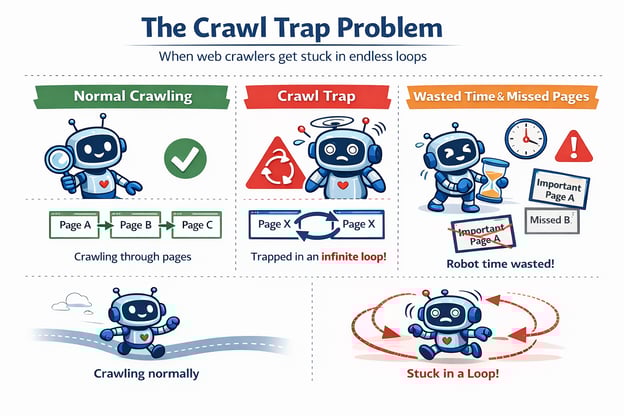
Faceted navigation (definition and the “crawl trap” problem)
Faceted navigation is common on e-commerce sites and allows filtering by attributes (size, colour, price, brand). Each filter combination can create a new URL.
A crawl trap is when bots can generate near-infinite URL combinations through filters and sorts. This wastes crawl capacity and can flood the index with thin duplicates.
Controls include:
- Canonicals back to the main category where appropriate
- Noindex on low-value filter combinations
- Restricting crawl paths via robots.txt (carefully, so you do not block important indexable pages)
- Internal linking rules so you do not link to every possible filter URL
Structured data (schema): helping search engines understand meaning
Structured data is code added to a page that describes entities and properties in a standard format. The most common format is JSON-LD, which Google recommends in its structured data documentation.
Below is a JSON-LD Blog Posting Schema example
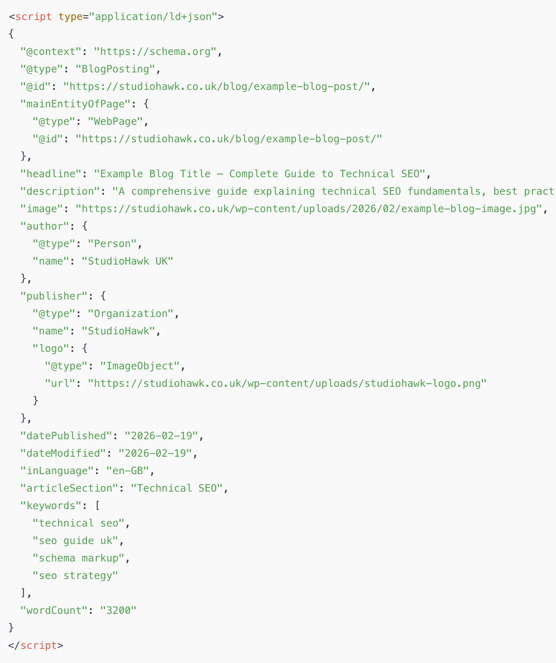

- Schema markup: the vocabulary used (from Schema.org)
- Entity: a thing that can be uniquely identified (an organisation, a person, a service, a product)
- Properties: attributes of that entity (name, logo, sameAs profiles, address)
- Rich results: enhanced search results that may show FAQs, reviews, breadcrumbs, etc. Eligibility depends on correct markup and content policy compliance.
Practical meaning:
- Schema does not guarantee rich results.
- Schema can improve clarity and reduce ambiguity about what a page represents.
Real example using StudioHawk UK
Pages like https://studiohawk.co.uk/seo-services/technical-seo/ are good candidates for Organisation and Service-related structured data, plus breadcrumbs. Blog posts can use Article schema. The goal is not “more schema everywhere”. The goal is accurate schema that matches visible content and supports understanding.
JavaScript SEO: how modern sites can accidentally hide their content
JavaScript is not a ranking problem by default. The problems happen when key content and links are not present in the initial HTML.
Key terms:
- Client-side rendering (CSR): the browser builds the page after downloading JavaScript. Risk: content can be delayed or missed in rendering.
- Server-side rendering (SSR): the server sends a fully rendered HTML page. Benefit: Content is immediately available to crawlers.
- Hydration: When a server-rendered page becomes interactive by attaching JavaScript events.
Practical meaning:
- If your navigation links are only created after JS runs, Google may discover fewer pages.
- If your main content is loaded via API calls after page load, indexing can be delayed.
- SSR or hybrid rendering usually reduces risk for SEO-critical pages.
HTTP status codes, errors, and redirects
Status codes tell crawlers what happened when they requested a URL.
Key terms you must understand:
- 200 OK: the page loaded normally.
- 301 redirect: a permanent redirect. Best for migrations and canonical consolidation.
- 302 redirect: temporary redirect. Google may treat it similarly to 301 in many cases, but you should use it intentionally, not accidentally.
- 404 Not Found: the page does not exist. Fine when true.
- 410 Gone: the page is intentionally removed and not coming back. Useful for faster removal signals.
- 500 server error: the server failed. Bad for crawling and user trust.
Redirect concepts:
- Redirect chain: A redirects to B redirects to C. This wastes crawl and slows users.
- Redirect loop: A redirects to B redirects back to A. This can kill crawling.
Example
If you ever restructure service URLs (for example, renaming a folder), a clean 301 redirect from the old URL to the new URL protects existing rankings and backlinks. That is migration hygiene, not optional.
HTTPS, mixed content, and security signals
HTTPS encrypts data between the browser and the server. It is also a trust signal and a basic standard for modern sites.
Key terms:
- SSL/TLS certificate: enables HTTPS.
- Mixed content: an HTTPS page that loads some resources (images, scripts) over HTTP. This can trigger browser warnings and break functionality.
- HSTS: a security header that forces browsers to use HTTPS.
Practical meaning:
- An HTTPS site should 301 redirect all HTTP versions to HTTPS.
- Mixed content should be eliminated, not ignored.
International SEO fundamentals (for UK sites with multiple regions)
If you target multiple countries or languages, hreflang is a technical requirement.
Key terms:
- hreflang: an HTML attribute that tells search engines which page is intended for which language or region.
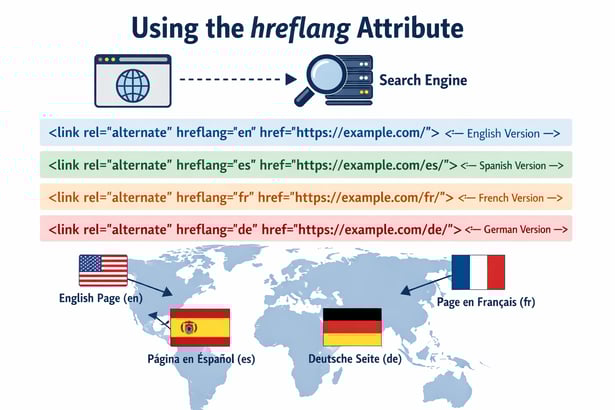
- x-default: a fallback version for users who do not match a specified language/region.
- Reciprocal annotation: if page A points to page B via hreflang, page B should also point back to page A.
Incorrect hreflang can cause the wrong version to rank in the UK, or can suppress visibility due to conflicting signals.
How to run a proper technical SEO audit (beyond a checklist)
A technical audit is not “run a crawl and export errors”. A good audit connects issues to outcomes: rankings, crawling efficiency, conversion rate, and index quality.
A thorough audit typically includes:
- Crawl diagnostics (errors, redirect chains, duplicate clusters, thin templates)
- Index coverage review in Google Search Console (what is indexed, what is excluded, and why)
- Site architecture mapping (click depth, orphaning, internal link distribution)
- Performance review (Core Web Vitals field data plus lab diagnosis)
- Rendering checks (view rendered HTML, inspect blocked resources)
- Structured data validation and coverage review
- Parameter and duplication controls (canonicals, noindex, internal linking rules)
- Log file analysis for larger sites (what bots actually crawl, not what you assume)
Google Search Console is not optional for this. It is your direct view into Google’s indexing and UX reporting, including the Core Web Vitals report.
Technical SEO change management: how to avoid breaking your rankings
Many technical SEO disasters happen during routine changes. Templates get edited, plugins update, or a staging config leaks into production.
High-risk changes include:
- CMS migrations
- Theme rebuilds
- URL structure changes
- Navigation changes
- JavaScript framework changes
- Large-scale content pruning
A basic safeguard process is:
- Pre-launch crawl and indexability checks
- Redirect mapping and validation
- Post-launch monitoring in Search Console
- Spot-checking key pages (service pages, contact pages, top traffic blog posts)
Real example using StudioHawk UK
Your highest-intent pages are usually service pages and the contact page. If you were doing a redesign, those pages (for example, https://studiohawk.co.uk/seo-services/technical-seo/ and https://studiohawk.co.uk/contact/) should be in the “must test” list for indexability (no accidental noindex), canonical integrity, performance, and mobile UX.
Common technical SEO problems and what they look like in the real world
Here are issues that repeatedly cause traffic drops:
- Accidental noindex on key templates (pages disappear from search)
- robots.txt blocking important directories (Google cannot crawl updated content)
- Canonicals pointing to the wrong URL (Google indexes the wrong version)
- Parameter explosion (thousands of low-value URLs indexed)
- Poor Core Web Vitals on important templates (slower pages, worse UX, weaker competitiveness)
- Broken internal links and orphan pages (Google struggles to discover and value new content)
- Redirect chains after migrations (lost equity, slower crawling)
The main takeaway is that technical SEO is not “one big fix”. It is continuous maintenance and intentional site management.
Need help growing your organic traffic?
If you're unsure where to begin or want expert support to build a content strategy that actually delivers results, speak to the team at Studiohawk. We'll help you create and maintain content that remains relevant, useful, and optimised for long-term growth.
Contact our SEO experts today.