If you want your website to show up in Google, you need to understand one thing first: search engines can’t rank what they can’t crawl.
Crawling is the starting point of organic visibility. Before a page can be indexed (stored in Google’s database) and later ranked, it has to be discovered, fetched, analysed, and processed.
In this guide, we’ll break down the stages of search engine crawling and show you what to optimise so Google can find and understand your most important pages efficiently. This blog will give you a solid overview of search engine crawling, which all boils down to technical SEO. To gain a more holistic view, we have a technical SEO guide that explains all the parameters in detail.
What is search engine crawling?
Search engine crawling is the process of discovering and downloading content from web pages using automated bots (also known as crawlers or spiders).
Google explains crawling as the way its systems discover and download text, images, and videos from pages on the internet. From there, the content can be processed for indexing and ranking later.
In simple terms:
- Crawlers find web pages (usually through links or sitemaps). They discover new and updated URLs through internal/external links, XML sitemaps, and signals like redirects.
- They fetch the content: The crawler requests the page and downloads what it can access (HTML and important resources) to understand what’s on it.
- They analyse the code and page elements: They interpret the HTML, headings, links, structured data, canonicals, and render key elements to understand context and quality.
- They store key information so the page can potentially appear in search results: Google saves what it learned in its index so the page can be matched to relevant searches and ranked.
Crawlers, spiders, and bots (what they actually do)
Crawlers don’t behave like humans browsing a site.
They don’t read a page the same way you do. They request a page from a server, retrieve the code, and look for signals that help them understand:
- What the page is about
- How it relates to other pages
- Whether it should be indexed
- Which other URLs should be crawled next
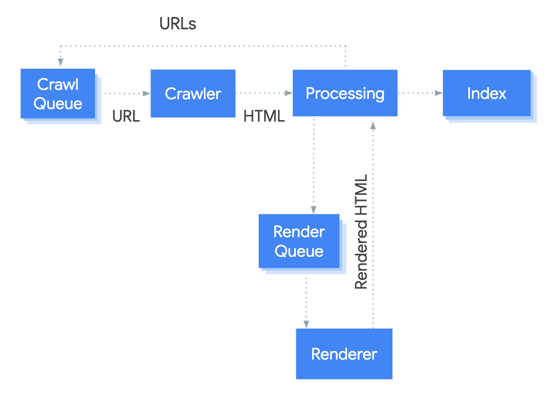
Search engine bots and user agent strings
Different search engines use different crawlers, and each crawler identifies itself using a user agent string.
This matters because if you accidentally block access (for example, with robots.txt rules), the crawler may never reach the content. If that happens, the page may never be indexed or ranked.
Here are a few common bots:
- Googlebot (Google Search)
- Bingbot (Bing)
- DuckDuckBot (DuckDuckGo)
- YandexBot (Yandex)
- Baiduspider (Baidu)
- Applebot (Apple Spotlight / Siri suggestions)
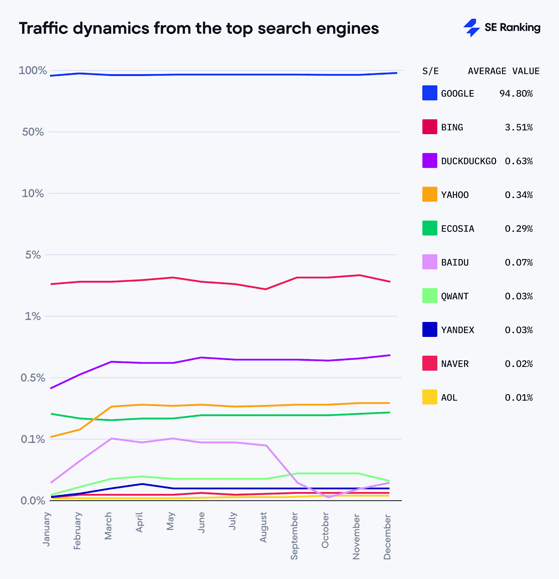
If your technical SEO foundations are clean, crawlers can get in, discover content quickly, and prioritise the right pages. Below is an image showcasing the current search engine market share according to seranking:
The 5 stages of search engine crawling
Search engines don’t just scan a site instantly. Crawling is a process made up of multiple steps, and each step can introduce issues that slow things down or stop pages from being indexed altogether.
Below are the five key stages.
Stage 1: Discovery
Everything starts with URL discovery.
Search engines need to find out that a page exists before they can crawl it. They discover pages through signals such as:
- Internal links (navigation, contextual links, categories): Internal links are links that point from one page on your website to another page on the same website (same domain)
- External links (backlinks): Backlinks are links on other websites that point to your website. In the world of SEO (Search Engine Optimisation), they’re like votes of credibility from other sites. The more high-quality backlinks you have, the higher your website is likely to rank in search results.
- XML sitemaps: An XML sitemap is a file that gives search engines information about the important pages (and other files) on your site, so they can crawl it more efficiently.
- Existing pages being re-crawled (and revealing new URLs)
- Manual submission in tools like Google Search Console
A key point here: discovery doesn’t guarantee indexing. A URL can be found and crawled and still never appear in search results if Google decides it isn’t useful, accessible, or index-worthy.
Stage 2: Fetching
Once the crawler chooses a URL to visit, it sends a request to the website’s server.
This is the fetching stage, where Googlebot (or another crawler) retrieves the page content.
Typically, the server responds with:
- The HTML source code looks like this:
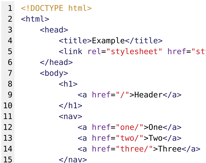
- References to images, stylesheets (CSS), JavaScript files, and other assets
If the server struggles (slow response times, overload, errors), crawlers may reduce their crawl rate to avoid causing disruption.
Stage 3: Parsing
After fetching the page, the crawler parses the HTML to extract useful information. According to H.Zhang parsing means analysing text or data to break it down into grammatical parts (like words, phrases, subjects, verbs) and understanding the relationships between them.
During parsing, crawlers typically pull out:
- Links (internal links and external links)
- Resources (images, CSS, JavaScript, embedded assets)
- Metadata (title tag, meta description, headings, and other signals)
- This stage helps search engines understand how pages connect to each other and which URLs should be added to the crawl queue next.
Stage 4: Rendering
This is where crawling gets more technical.
Many modern websites rely heavily on JavaScript (JavaScript = programming language and core web technology) to display or load content. That means a crawler may need to render the page (similar to how a browser processes it) to fully understand what users see.
If key content is only available after JavaScript execution, and the render process fails or gets blocked, Google may struggle to see the full page.
Common issues that affect rendering:
- JavaScript-heavy frameworks with poor SEO handling
- Important content not present in the initial HTML
- Slow performance and timeouts
- Blocked resources (CSS/JS) in robots.txt
Stage 5: Indexing
Indexing is the stage where search engines store information about a page in their index so it can appear in results.
The index can contain signals such as:
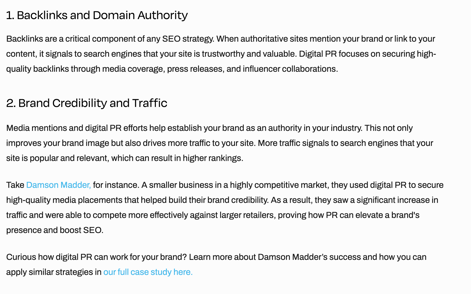
- Text content and topical relevance
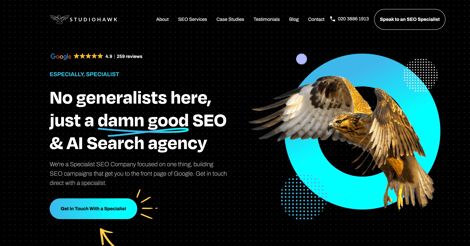
Evidence: The core headline and supporting copy targets “SEO & AI Search agency” and “Specialist SEO Company”, which aligns with top-of-funnel + commercial intent.
- Structured data
- Internal and external link relationships
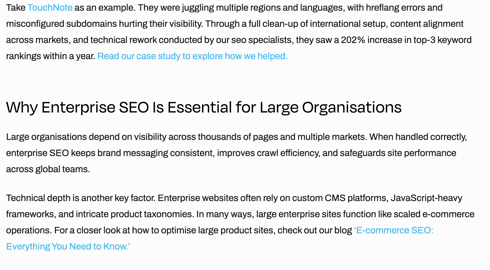 Evidence: Internal linking (prompting the user to our case studies) "Read our case study to explore how we helped". External linking (prompting the user to an external webpage) "Touchnote"
- Metadata (Title tags, headings, page topic signals)

- Page performance and mobile usability indicators (UX/Layout)

Evidence: Clear navigation structure + short CTA blocks (typically good for responsive layout and scannability)
This information then feeds into ranking systems to decide when (and if) the page should show up for relevant searches.
Crawling vs indexing (what’s the difference?)
These two terms get mixed up constantly, but they’re not the same thing.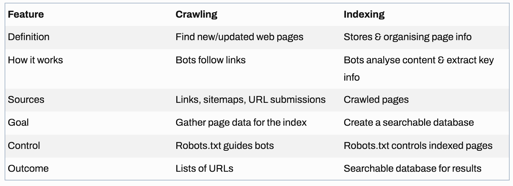
Crawling = finding and retrieving content from a URL
Indexing = storing and organising the page content for search
A simple 1,2,3 breakdown:
- Crawling happens first
- Indexing happens after
- Ranking comes later
So if you have pages that aren’t ranking, the real issue might be that they’re not even being crawled or indexed consistently.
How search engines discover and index web pages
If you want to improve organic performance, it helps to think about discovery and indexing like a pipeline.
Discovery signals (how pages get found)
To improve discovery, focus on:
- Strong internal linking between related pages
- Clean information architecture (logical navigation)
- Accurate XML sitemaps
- Ensuring key pages aren’t orphaned
- Earning relevant backlinks
You can also speed up discovery by manually submitting URLs through Google Search Console.
Indexing signals (how pages get stored)
Once crawled, search engines look for signals that suggest a page is worth indexing, including:
-
Content quality and relevance (does it solve a real query?)
The page directly answers what the user searched for, clearly and completely. -
Title tags, headings, and semantic structure
The page has a strong title in Google results, uses H1/H2/H3 headings properly, and is organised in a way search engines can understand. -
Mobile-friendliness
The page works properly on phones (readable text, tappable buttons, no layout issues). - Crawl accessibility (no blocking rules)
Google can actually access the page -
Page speed and stability
The page loads quickly and doesn’t jump around while loading (good user experience). -
Structured data where relevant
Extra code (schema) that helps Google understand the content (like FAQs, reviews, products, events). -
Clear internal links supporting topical relevance
Your pages link to each other in a logical way (blogs → service pages → related guides), helping Google understand your main topics and helping users navigate.
If you have thin pages, duplication, or a poor user experience, crawlers may still visit, but Google may decide not to index consistently.
Final word: how to improve crawlability and your chances of being indexed
If you want your pages crawled efficiently (and indexed consistently), keep the foundations simple:
- Make sure your XML sitemap is up to date and includes the pages you actually want indexed
- Strengthen your internal linking, especially between related articles and service pages
- Avoid unnecessary URL bloat (filters, duplicates, parameter mess)
- Fix server errors, slow performance, and blocked resources
- Use Google Search Console to identify crawl and indexing issues early
If your site has solid technical foundations, search engines have fewer reasons to waste crawl time, which means your most valuable pages get priority.
Check out how our friends at DR.Stretch did after coming in contact with the Hawks.
Need help growing your organic traffic?
If you're unsure where to begin or want expert support to build a content strategy that actually delivers results, speak to the team at Studiohawk. We'll help you create and maintain content that remains relevant, useful, and optimised for long-term growth.
Contact our SEO experts today.